Laragon vs XAMPP: Which Should PHP Beginners Use on Windows?
If you’re just getting into PHP development on Windows and you’ve been googling how to run PHP locally, you’ve almost certainly landed on comparing Laragon vs XAMPP. Both are free. Both let you run PHP, MySQL, and a web server right on your laptop. And both have a huge following online.
But they’re very different tools — and for a beginner, picking the wrong one can mean spending your first hour fiddling with config files instead of actually writing code.
I’ve used both. Here’s my honest take.
| Quick verdict Laragon — best for PHP beginners on Windows, especially if you’re learning Laravel. Faster, cleaner, and easier to work with day-to-day. XAMPP — still perfectly usable, especially if you’re on Mac/Linux too, or just need a quick no-fuss Apache + MySQL environment. |
What Are They?
XAMPP
XAMPP has been around since 2002 and is one of the most widely used local development environments in the world. The name stands for X (cross-platform), A (Apache), M (MariaDB/MySQL), P (PHP), and P (Perl).
You download one installer, run it, and you get Apache, MySQL, PHP, and phpMyAdmin all bundled together. It’s cross-platform — it works on Windows, Mac, and Linux — which is part of why it became so popular.
Laragon
Laragon is a newer, Windows-only local development environment built with modern PHP workflows in mind. It was created by Leo Khoa and has grown steadily in popularity, particularly in the Laravel community.
Like XAMPP, it gives you Apache (or Nginx), MySQL, and PHP out of the box. But it also includes Composer, Node.js, Git, and npm — all pre-configured and ready to use. For anyone learning Laravel, this is a massive head start.
Head-to-Head Comparison
| Laragon | XAMPP | |
| Windows support | Yes | Yes |
| Mac / Linux support | No | Yes |
| Free to use | Yes | Yes |
| Startup speed | Very fast (native compiled services) | Slower |
| Includes Composer | Yes — built in | No — install manually |
| Includes Git | Yes — built in | No — install manually |
| Includes Node.js / npm | Yes — built in | No — install manually |
| Laravel support | Excellent — one command | Possible but manual |
| Auto virtual hosts | Yes — automatic | No — manual config |
| Switch PHP versions | Easy — UI dropdown | Complicated — manual |
| Pretty URLs (localhost/myproject) | Yes — automatic | No — manual setup |
| phpMyAdmin included | Yes | Yes |
| Open source | Partially (free to use) | Yes — fully open source |
| Best for | PHP / Laravel beginners on Windows | Cross-platform or absolute beginners |
Setup: Which Is Easier to Install?
Both are a single installer download. But the out-of-the-box experience differs quite a bit.
XAMPP setup
Download the installer from apachefriends.org, run it, and within a few minutes you have a control panel with big start/stop buttons for Apache and MySQL. Simple. But to get a proper project running, you’ll need to put your files in the htdocs folder and manually set up a virtual host if you want a clean URL. For a complete beginner, this can be confusing.
Laragon setup
Download from laragon.org, run the installer, and Laragon creates a www folder for your projects. Every folder you drop in there automatically gets its own pretty URL — if you create a folder called mysite, it’s instantly available at mysite.test in your browser. No config files, no editing hosts files manually.
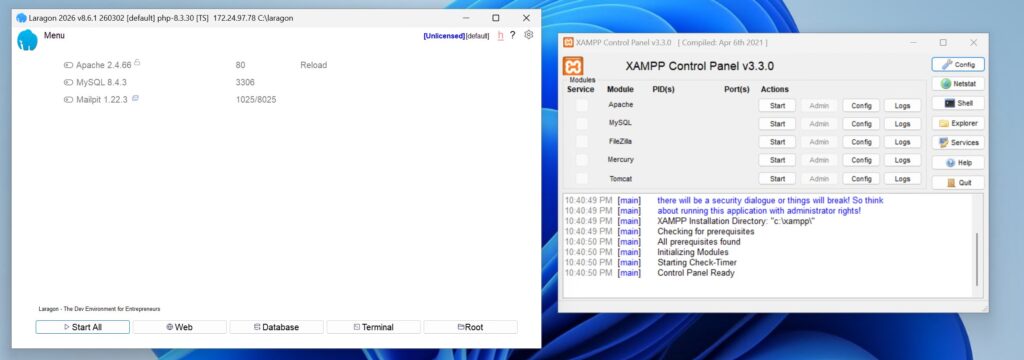
Once installed – both come with a simple user interface to start and stop services and links to files to edit the configuration.
| Setup verdict Laragon wins for beginners — especially Laravel beginners. The automatic virtual hosts and bundled Composer/Git alone save hours of friction. |
Speed and Performance
Laragon compiles its services to native Windows code, which means it starts up very fast — we’re talking a few seconds from cold. XAMPP runs Apache as a more traditional process and can feel sluggish on slower machines or when you’re running multiple projects.
In day-to-day use the difference isn’t dramatic for simple PHP scripts. But for a Laravel application with queues, caching, and multiple database connections, Laragon’s lighter footprint is noticeable.
One slight nuance: some benchmark tests have shown XAMPP can edge out Laragon on raw database write speed in certain scenarios — likely because Laragon’s extra features (Git, Node, Composer integration) add a small overhead. But for a beginner running tutorials or building personal projects, this difference is meaningless.
| Speed verdict Laragon starts faster and feels snappier in everyday use. XAMPP may have a marginal raw performance edge in some specific database benchmarks, but it won’t matter for beginners. |
Switching PHP Versions
This is one of the biggest practical differences, and it matters more than you’d think.
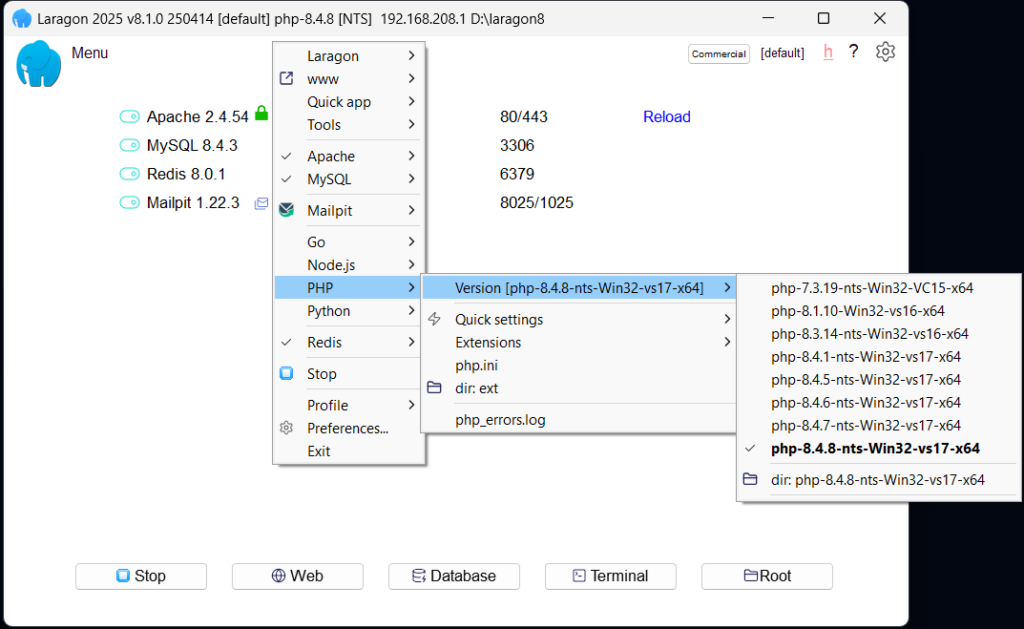
If you’re working on multiple PHP projects — say, one built on PHP 7.4 and another on PHP 8.3 — you need to switch PHP versions between them. With XAMPP, this involves manually downloading PHP, editing Apache config files, and restarting services. It’s not impossible, but it’s error-prone and annoying.
With Laragon, you right-click the system tray icon, go to PHP > Switch version, select the version you want, and click. Done. You can also run multiple PHP versions side by side using Laragon’s port-based project system.
For anyone planning to work on real-world projects or client sites with different PHP requirements, Laragon’s version switching is a genuinely significant advantage.
Laravel Support
If you’re learning PHP with the intention of moving to Laravel — which is the most popular PHP framework and well worth learning — this section is important.
With Laragon
Laragon was essentially built with Laravel in mind. Composer is pre-installed, the terminal is pre-configured, pretty URLs work automatically, and there’s even a one-click ‘Quick app’ menu that creates a new Laravel project in seconds. It just works.
With XAMPP
XAMPP can run Laravel, but you need to:
- Install Composer separately
- Configure Apache’s DocumentRoot or a VirtualHost to point to Laravel’s /public folder
- Edit your hosts file manually to create a pretty URL
- Possibly adjust PHP extensions in php.ini
None of this is impossible, but it’s a lot of extra steps before you’ve written a single line of Laravel code. For a beginner, this friction often leads to giving up before you’ve started.
| Laravel verdict Laragon wins comfortably. It’s the tool the Laravel community actually uses on Windows, and the difference in setup time is significant — often hours vs minutes. |
When to Choose Each
| Choose Laragon if… | Choose XAMPP if… |
| You’re on Windows | You’re on Mac or Linux (Laragon is Windows-only) |
| You’re learning Laravel or Composer-based PHP | You just need quick Apache + MySQL — no framework |
| You want automatic virtual hosts and pretty URLs | You’re following a tutorial specifically using XAMPP |
| You want Composer, Git and Node.js ready to go | You need a cross-platform solution across devices |
| You’re tired of editing config files | You prefer fully open source software |
What I Actually Use
I use Laragon. I switched from XAMPP a few years ago and genuinely haven’t looked back. The automatic virtual hosts alone were worth the switch — no more editing my hosts file every time I start a project. And having Composer and Git bundled in means I can clone a repo and have it running in minutes.
The only time I’d recommend XAMPP is if you’re on Mac or Linux, or if you’re following a specific tutorial that assumes XAMPP’s file structure. Outside of those cases, Laragon is just a better day-to-day experience for Windows PHP development.
Frequently Asked Questions
Is Laragon better than XAMPP for beginners?
For beginners on Windows, yes — especially if you’re learning PHP with Laravel. Laragon handles a lot of the configuration that XAMPP leaves to you manually. That said, XAMPP is simpler in its most basic form and has better documentation for absolute beginners just running raw PHP scripts.
Does Laragon work on Mac?
No. Laragon is Windows-only. If you’re on a Mac, look at Laravel Herd (a similar modern local environment) or MAMP. XAMPP is available for Mac but can be tricky to configure for modern PHP frameworks.
Can I use Laragon with WordPress?
Yes. Laragon works great with WordPress. Create a folder in the www directory, drop WordPress in, and it’s automatically available at yourfoldername.test. No virtual host configuration needed.
Is XAMPP still worth using in 2026?
Yes, XAMPP is still actively maintained and perfectly capable. It’s especially worth using if you’re on Mac or Linux, or if you’re following learning materials that use XAMPP as their assumed environment. It’s just no longer the best default choice for PHP beginners on Windows.
Is Laragon free?
Yes, Laragon is free to download and use. However the free version will pop up with a licence reminder box every once in a while which can just be dismissed, however if you find the software genuinly useful – a licence only costs $10 one time fee for non-comercial use, and helps support the developer maintaining Laragon.
Conclusion
Both Laragon and XAMPP will get you writing PHP locally on Windows — but they take different approaches. XAMPP is the old reliable: cross-platform, well-documented, and fine for simple use cases. Laragon is the modern choice: faster to set up, better for Laravel, and a significantly nicer day-to-day experience on Windows.
For most PHP beginners on Windows in 2026, my recommendation is to start with Laragon. You’ll spend less time on setup and more time actually learning PHP.
| Up next on Kilobyte Workbench Once you’ve got Laragon set up, the next step is writing your first PHP project. Check out: Your First PHP Project: Build a Simple Contact Form — a step-by-step tutorial that works perfectly with the Laragon setup described here. |